Virtual Background
Virtual Background enables users to blur their background, or replace it with a solid color or an image. This feature is applicable to use-cases such as online conferences, online classes, and live streaming. It helps protect personal privacy and reduces audience distraction.
Understand the tech
Virtual Background offers the following options:
| Feature | Example |
|---|---|
| Blurred background and image background | 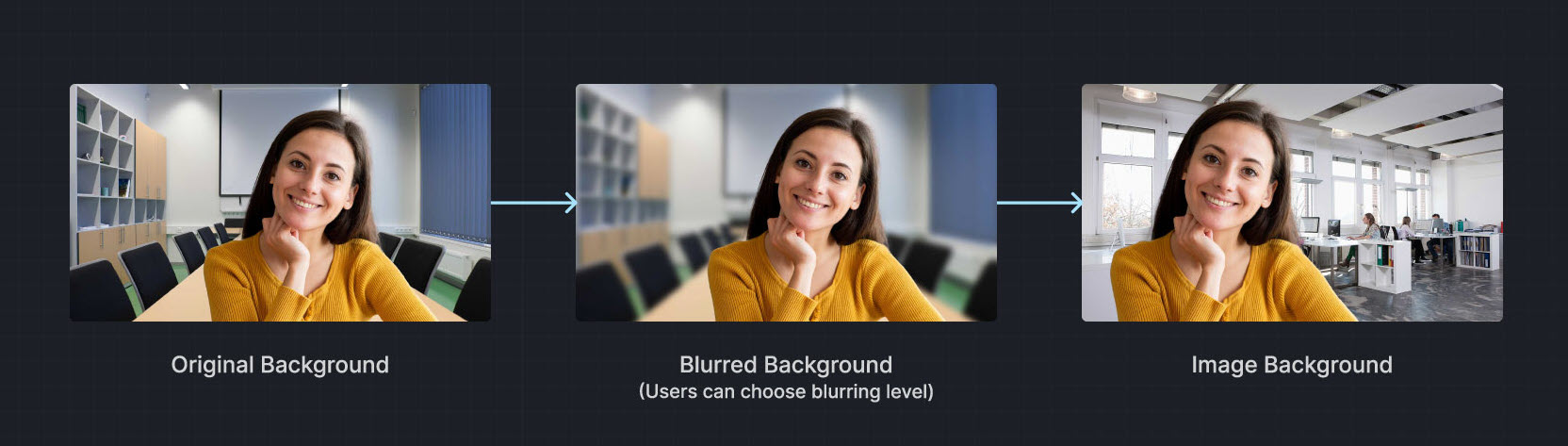 |
| Video/Animated background | |
| Portrait-in-picture |  Allows the presenter to use slides as the virtual background while superimposing their video. The effect is similar to a weather news cast on television, preventing interruptions during a layout toggle. Allows the presenter to use slides as the virtual background while superimposing their video. The effect is similar to a weather news cast on television, preventing interruptions during a layout toggle. |
Want to test Virtual Background? Try the online demo.
Prerequisites
Ensure that you have implemented the SDK quickstart in your project.
Implement virtual background
This section shows you how to add a virtual background to the local video.
Check device compatibility
To avoid performance degradation or unavailable features when enabling Virtual Background on low-end devices, check whether the device supports the feature.
- Java
- Kotlin
boolean isFeatureAvailable() { return agoraEngine.isFeatureAvailableOnDevice( Constants.FEATURE_VIDEO_VIRTUAL_BACKGROUND );}fun isFeatureAvailable(): Boolean { return agoraEngine.isFeatureAvailableOnDevice( Constants.FEATURE_VIDEO_VIRTUAL_BACKGROUND )}Set a blurred background
To blur the video background, use the following code:
- Java
- Kotlin
void setBlurBackground() { VirtualBackgroundSource virtualBackgroundSource = new VirtualBackgroundSource(); virtualBackgroundSource.setBackgroundSourceType(VirtualBackgroundSource.BACKGROUND_BLUR); virtualBackgroundSource.setBlurDegree(VirtualBackgroundSource.BLUR_DEGREE_MEDIUM); // Set processing properties for background SegmentationProperty segmentationProperty = new SegmentationProperty(); segmentationProperty.setModelType(SegmentationProperty.SEG_MODEL_AI); // Use SEG_MODEL_GREEN if you have a green background segmentationProperty.setGreenCapacity(0.5f); // Accuracy for identifying green colors (range 0-1) // Enable or disable virtual background agoraEngine.enableVirtualBackground(true, virtualBackgroundSource, segmentationProperty);}fun setBlurBackground() { val virtualBackgroundSource = VirtualBackgroundSource() virtualBackgroundSource.setBackgroundSourceType(VirtualBackgroundSource.BACKGROUND_BLUR) virtualBackgroundSource.setBlurDegree(VirtualBackgroundSource.BLUR_DEGREE_MEDIUM) // Set processing properties for background val segmentationProperty = SegmentationProperty() segmentationProperty.setModelType(SegmentationProperty.SEG_MODEL_AI) // Use SEG_MODEL_GREEN if you have a green background segmentationProperty.setGreenCapacity(0.5f) // Accuracy for identifying green colors (range 0-1) // Enable or disable virtual background agoraEngine.enableVirtualBackground(true, virtualBackgroundSource, segmentationProperty)}Set a color background
To apply a solid color as the virtual background, use a hexadecimal color code. For example, 0x0000FF for blue:
- Java
- Kotlin
void setSolidBackground() { VirtualBackgroundSource virtualBackgroundSource = new VirtualBackgroundSource(); virtualBackgroundSource.setBackgroundSourceType(VirtualBackgroundSource.BACKGROUND_COLOR); virtualBackgroundSource.setColor(0x0000FF); // Set processing properties for background SegmentationProperty segmentationProperty = new SegmentationProperty(); segmentationProperty.setModelType(SegmentationProperty.SEG_MODEL_AI); // Use SEG_MODEL_GREEN if you have a green background segmentationProperty.setGreenCapacity(0.5f); // Accuracy for identifying green colors (range 0-1) // Enable or disable virtual background agoraEngine.enableVirtualBackground(true, virtualBackgroundSource, segmentationProperty);}fun setSolidBackground() { val virtualBackgroundSource = VirtualBackgroundSource() virtualBackgroundSource.setBackgroundSourceType(VirtualBackgroundSource.BACKGROUND_COLOR) virtualBackgroundSource.setColor(0x0000FF) // Set processing properties for background val segmentationProperty = SegmentationProperty() segmentationProperty.setModelType(SegmentationProperty.SEG_MODEL_AI) // Use SEG_MODEL_GREEN if you have a green background segmentationProperty.setGreenCapacity(0.5f) // Accuracy for identifying green colors (range 0-1) // Enable or disable virtual background agoraEngine.enableVirtualBackground(true, virtualBackgroundSource, segmentationProperty)}Set an image background
To set a custom image as the virtual background, specify the absolute path to the image file.
- Java
- Kotlin
void setImageBackground() { VirtualBackgroundSource virtualBackgroundSource = new VirtualBackgroundSource(); virtualBackgroundSource.setBackgroundSourceType(VirtualBackgroundSource.BACKGROUND_IMG); virtualBackgroundSource.setSource("<absolute path to an image file>"); // Set processing properties for background SegmentationProperty segmentationProperty = new SegmentationProperty(); segmentationProperty.setModelType(SegmentationProperty.SEG_MODEL_AI); // Use SEG_MODEL_GREEN if you have a green background segmentationProperty.setGreenCapacity(0.5f); // Accuracy for identifying green colors (range 0-1) // Enable or disable virtual background agoraEngine.enableVirtualBackground(true, virtualBackgroundSource, segmentationProperty);}fun setImageBackground() { val virtualBackgroundSource = VirtualBackgroundSource() virtualBackgroundSource.setBackgroundSourceType(VirtualBackgroundSource.BACKGROUND_IMG) virtualBackgroundSource.setSource("<absolute path to an image file>") // Set processing properties for background val segmentationProperty = SegmentationProperty() segmentationProperty.setModelType(SegmentationProperty.SEG_MODEL_AI) // Use SEG_MODEL_GREEN if you have a green background segmentationProperty.setGreenCapacity(0.5f) // Accuracy for identifying green colors (range 0-1) // Enable or disable virtual background agoraEngine.enableVirtualBackground(true, virtualBackgroundSource, segmentationProperty)}Reset the background
To disable the virtual background and revert to the original video state, use the following code:
- Java
- Kotlin
void removeBackground() { // Disable virtual background agoraEngine.enableVirtualBackground( false, new VirtualBackgroundSource(), new SegmentationProperty() );}fun removeBackground() { // Disable virtual background agoraEngine.enableVirtualBackground( false, VirtualBackgroundSource(), SegmentationProperty() )}Reference
This section contains content that completes the information in this page, or points you to documentation that explains other aspects to this product.