
Quickstart using middleware

To streamline the use of Agora RESTful APIs within your infrastructure, Agora’s developer community offers the open-source Agora Go Backend Middleware. This backend provides RESTful APIs for tasks such as token generation, cloud recording management, and real-time transcription. It simplifies the integration of Agora’s cloud services into your real-time voice and video applications. This guide shows you how to implement cloud recording using the community middleware.

Understand the tech​

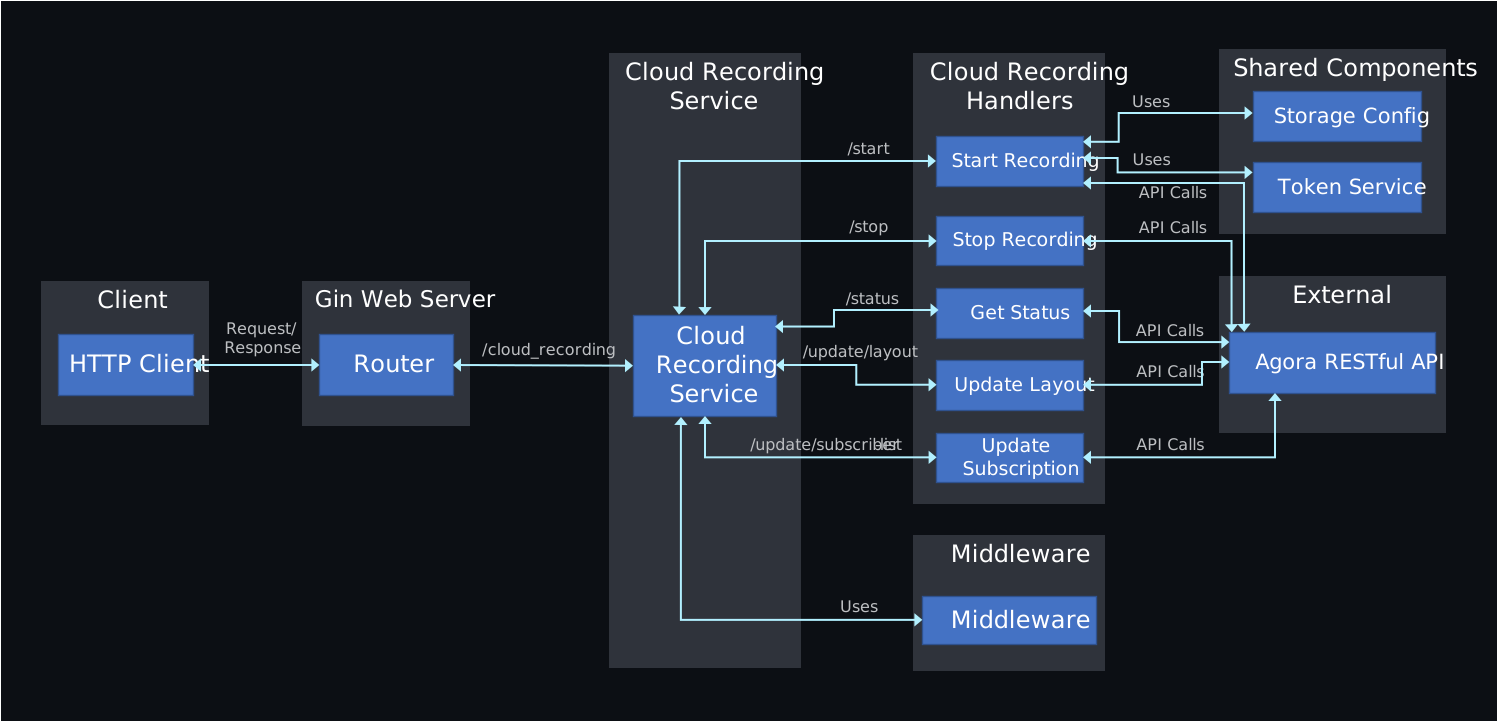
The following figure illustrates the architecture of the middleware cloud recording micro service.
Set up and run the Go backend middleware​

Take the following steps to set up and run the middleware project:

  1. Clone the repository


    _1
    git clone https://github.com/AgoraIO-Community/agora-go-backend-middleware.git

  2. Install dependencies
    Ensure you have Go installed on your system. Navigate to the project directory and install the project dependencies:


    _2
    cd agora-go-backend-middleware
    _2
    go mod download

  3. Configure environment variables

    1. Copy the example .env file.


      _1
      cp .env.example .env

    2. Update the following variables in the .env file:

      • APP_ID: Your Agora App ID.
      • APP_CERTIFICATE: Your Agora App Certificate.
      • CUSTOMER_ID: Your customer ID
      • CUSTOMER_SECRET: Your Customer Secret
      • STORAGE_VENDOR: Cloud storage vendor (e.g., AWS, GCP).
      • STORAGE_REGION: Region of your cloud storage.
      • STORAGE_BUCKET: Bucket name.
      • STORAGE_ACCESS_KEY: Cloud storage access key.
      • STORAGE_SECRET_KEY: Cloud storage secret key.
  4. Run the middleware:

    Start the middleware server using the following command:


    _1
    go run cmd/main.go

    The middleware runs on the default port, for example localhost:8080.

Implement Cloud Recording using middleware​

This section explains the RESTful API calls to the backend middleware for starting, managing, and stopping a Cloud Recording session.

Start recording​

To start a Cloud Recording session refer to the following examples:

info

The command-line examples in this guide are for demonstration purposes only. Do not use them directly in a production environment. Implement RESTful API requests through your application server.

  • Basic example


    _8
    curl -X POST http://localhost:8080/cloud_recording/start \
    _8
    -H "Content-Type: application/json" \
    _8
    -d '{
    _8
    "channelName": "test_channel",
    _8
    "sceneMode": "realtime",
    _8
    "recordingMode": "mix",
    _8
    "excludeResourceIds": []
    _8
    }'

  • Advanced example


    _41
    curl -X POST http://localhost:8080/cloud_recording/start \
    _41
    -H "Content-Type: application/json" \
    _41
    -d '{
    _41
    "channelName": "testChannel",
    _41
    "sceneMode": "realtime",
    _41
    "recordingMode": "mix",
    _41
    "excludeResourceIds": [],
    _41
    "recordingConfig": {
    _41
    "channelType": 0,
    _41
    "decryptionMode": 1,
    _41
    "secret": "your_secret",
    _41
    "salt": "your_salt",
    _41
    "maxIdleTime": 120,
    _41
    "streamTypes": 2,
    _41
    "videoStreamType": 0,
    _41
    "subscribeAudioUids": ["#allstream#"],
    _41
    "unsubscribeAudioUids": [],
    _41
    "subscribeVideoUids": ["#allstream#"],
    _41
    "unsubscribeVideoUids": [],
    _41
    "subscribeUidGroup": 0,
    _41
    "streamMode": "individual",
    _41
    "audioProfile": 1,
    _41
    "transcodingConfig": {
    _41
    "width": 640,
    _41
    "height": 360,
    _41
    "fps": 15,
    _41
    "bitrate": 500,
    _41
    "maxResolutionUid": "1",
    _41
    "layoutConfig": [
    _41
    {
    _41
    "x_axis": 0,
    _41
    "y_axis": 0,
    _41
    "width": 640,
    _41
    "height": 360,
    _41
    "alpha": 1,
    _41
    "render_mode": 1
    _41
    }
    _41
    ]
    _41
    }
    _41
    }
    _41
    }'

Stop recording​

To stop an ongoing cloud recording session:


_10
curl -X POST http://localhost:8080/cloud_recording/stop \
_10
-H "Content-Type: application/json" \
_10
-d '{
_10
"cname": "test_channel",
_10
"uid": "uid-from-start-response",
_10
"resourceId": "resource-id-from-start-response",
_10
"sid": "sid-from-start-response",
_10
"recordingMode": "mix",
_10
"async_stop": false
_10
}'

Get Recording Status​

During the recording, call the status endpoint to query the recording status as required.


_1
curl -X GET "http://localhost:8080/cloud_recording/status?resourceId=your-resource-id&sid=your-sid&mode=mix"

Update Subscriber List​

To update the subscriber list during a recording session, refer to the following example:


_19
curl -X POST http://localhost:8080/cloud_recording/update/subscriber-list \
_19
-H "Content-Type: application/json" \
_19
-d '{
_19
"cname": "test_channel",
_19
"uid": "uid-from-start-response",
_19
"resourceId": "your-resource-id",
_19
"sid": "your-sid",
_19
"recordingMode": "mix",
_19
"recordingConfig": {
_19
"streamSubscribe": {
_19
"audioUidList": {
_19
"subscribeAudioUids": ["2345", "3456"]
_19
},
_19
"videoUidList": {
_19
"subscribeVideoUids": ["2345", "3456"]
_19
}
_19
}
_19
}
_19
}'

Update Layout​

To update the layout of a recording session, refer to the following example:


_24
curl -X POST http://localhost:8080/cloud_recording/update/layout \
_24
-H "Content-Type: application/json" \
_24
-d '{
_24
"cname": "test_channel",
_24
"uid": "uid-from-start-response",
_24
"resourceId": "your-resource-id",
_24
"sid": "your-sid",
_24
"recordingMode": "mix",
_24
"recordingConfig": {
_24
"mixedVideoLayout": 1,
_24
"backgroundColor": "#000000",
_24
"layoutConfig": [
_24
{
_24
"uid": "2345",
_24
"x_axis": 0,
_24
"y_axis": 0,
_24
"width": 360,
_24
"height": 640,
_24
"alpha": 1,
_24
"render_mode": 1
_24
}
_24
]
_24
}
_24
}'

Cloud Recording Middleware API Reference​

This section provides details about the Go middleware Cloud Recording API endpoints.

Start Recording​

Starts a cloud recording session.

Endpoint​

POST: /cloud_recording/start

Request Body​


_10
{
_10
"channelName": "string",
_10
"uid": "string",
_10
"recordingConfig": {
_10
// RecordingConfig fields
_10
},
_10
"storageConfig": {
_10
// StorageConfig fields
_10
}
_10
}

Response​


_5
{
_5
"resourceId": "string",
_5
"sid": "string",
_5
"timestamp": "string"
_5
}

Stop Recording​

Stops an ongoing cloud recording session.

Endpoint​

POST: /cloud_recording/stop

Request Body​


_8
{
_8
"cname": "string",
_8
"uid": "string",
_8
"resourceId": "string",
_8
"sid": "string",
_8
"recordingMode": "string",
_8
"async_stop": boolean
_8
}

Response​


_18
{
_18
"resourceId": "string",
_18
"sid": "string",
_18
"serverResponse": {
_18
"fileListMode": "string",
_18
"fileList": [
_18
{
_18
"fileName": "string",
_18
"trackType": "string",
_18
"uid": "string",
_18
"mixedAllUser": boolean,
_18
"isPlayable": boolean,
_18
"sliceStartTime": number
_18
}
_18
]
_18
},
_18
"timestamp": "string"
_18
}

Get Recording Status​

Retrieves the status of a cloud recording session.

Endpoint​

GET: /cloud_recording/status

Query Parameters​

  • resourceId: string
  • sid: string
  • mode: string

Response​


_18
{
_18
"resourceId": "string",
_18
"sid": "string",
_18
"serverResponse": {
_18
"fileListMode": "string",
_18
"fileList": [
_18
{
_18
"fileName": "string",
_18
"trackType": "string",
_18
"uid": "string",
_18
"mixedAllUser": boolean,
_18
"isPlayable": boolean,
_18
"sliceStartTime": number
_18
}
_18
]
_18
},
_18
"timestamp": "string"
_18
}

Update Subscriber List​

Updates the subscriber list for a cloud recording session.

Endpoint​

POST: /cloud_recording/update/subscriber-list

Request Body​


_10
{
_10
"cname": "string",
_10
"uid": "string",
_10
"resourceId": "string",
_10
"sid": "string",
_10
"recordingMode": "string",
_10
"recordingConfig": {
_10
// UpdateSubscriptionClientRequest fields
_10
}
_10
}

Response​


_7
{
_7
"cname": "string",
_7
"uid": "string",
_7
"resourceId": "string",
_7
"sid": "string",
_7
"timestamp": "string"
_7
}

Update Layout​

Updates the layout of a cloud recording session.

Endpoint​

POST: /cloud_recording/update/layout

Request Body​


_10
{
_10
"cname": "string",
_10
"uid": "string",
_10
"resourceId": "string",
_10
"sid": "string",
_10
"recordingMode": "string",
_10
"recordingConfig": {
_10
// UpdateLayoutClientRequest fields
_10
}
_10
}

Response​


_7
{
_7
"cname": "string",
_7
"uid": "string",
_7
"resourceId": "string",
_7
"sid": "string",
_7
"timestamp": "string"
_7
}

Replace localhost:8080 with your server's address, if it is different.