Secure channel encryption
Media stream encryption refers to encrypting audio and video streams in an app using a unique key and salt controlled by the app developer. Encryption ensures that only the authorized users in a channel see and hear each other. Voice SDK provides built-in encryption methods that you can use to guarantee data confidentiality during transmission.
This article describes how to integrate Agora built-in media stream encryption into your app.
Understand the tech
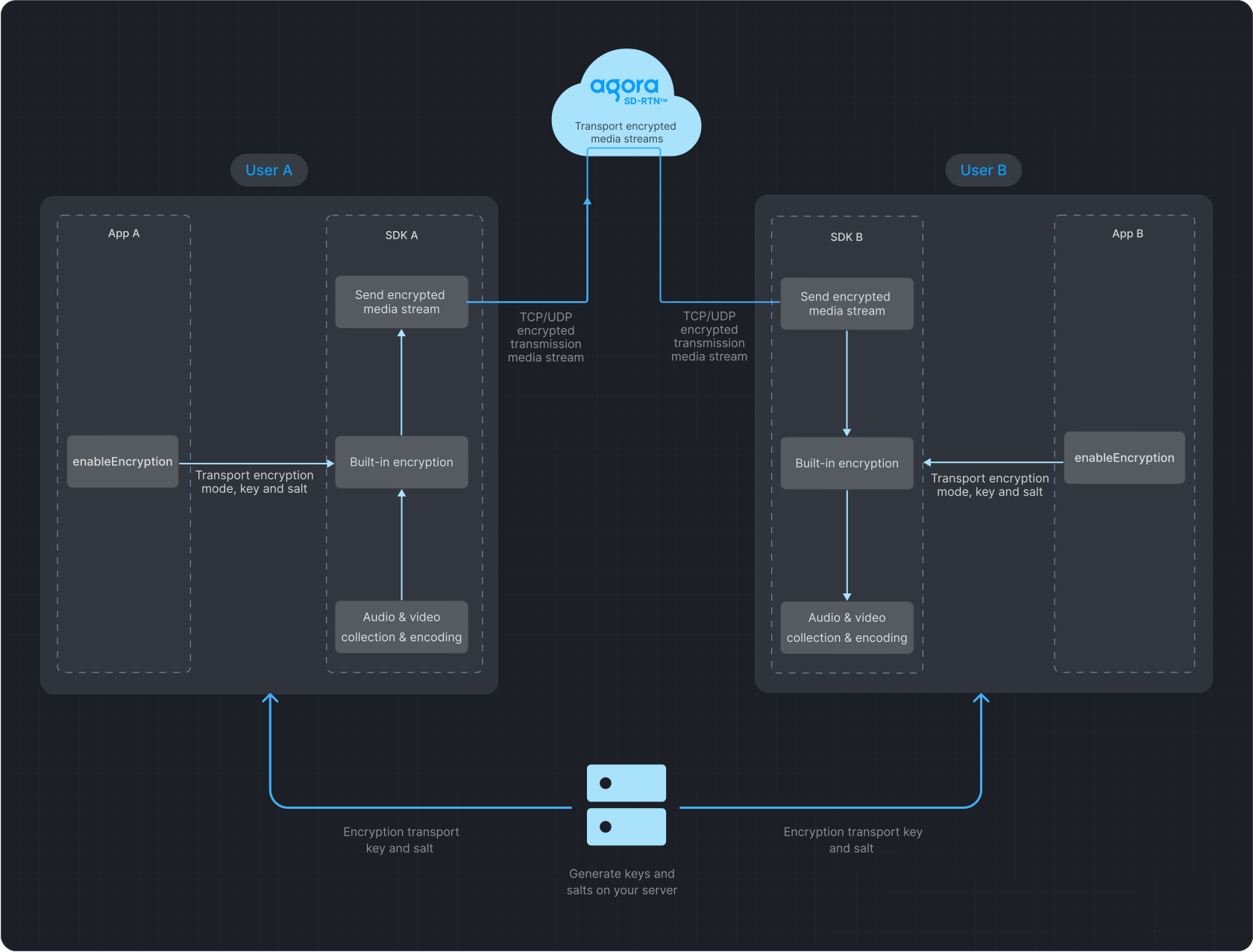
The following figure illustrates the process of data transfer with media stream encryption enabled.
Best practice is to choose the AES_128_GCM2 or AES_256_GCM2 encryption mode and set a key and salt for enhanced security.
Data transfer process
Prerequisites
Ensure that you have implemented the SDK quickstart in your project.
Implement media stream encryption
To add built-in media stream encryption to your app, refer to the following steps:
-
Generate a key and salt on your server
-
To generate a random 32-byte hexadecimal key on your server as a string, refer to the following
OpenSSLcommand: -
To generate a random Base64-encoded, 32-byte salt on your server, refer to the following
OpenSSLcommand:
-
-
Implement client-side logic
-
Obtain a String key and Base64-encoded salt from the server.
-
Convert the salt from Base64 to
uint8_t. -
Before joining the channel, call
enableEncryptionto set theAES_128_GCM2orAES_256_GCM2encryption mode, and pass the key and salt to the SDK.
-
- All users in a channel must use the same encryption mode, key, and salt. Discrepancies may lead to unexpected behavior, such as black screens or audio loss.
- To ensure security, best practice is to use a new key and salt each time you enable media stream encryption.
To implement this logic, refer to the following code:
- Java
- Kotlin
import java.util.Base64;import io.agora.rtc2.RtcEngine;import io.agora.rtc2.internal.EncryptionConfig;class Example { public boolean enableEncryption(RtcEngine mRtcEngine) { if (mRtcEngine == null) { return false; } // Obtain the Base64 encoded salt from the server String encryptionKdfSaltBase64 = Server.getEncryptionKdfSaltBase64(); // Obtain the String type key from the server String encryptionSecret = Server.getEncryptionSecret(); if (encryptionKdfSaltBase64 == null || encryptionSecret == null) { return false; } // Convert the Base64 encoded salt to uint8_t byte[] encryptionKdfSalt = Base64.getDecoder().decode(encryptionKdfSaltBase64); // Create an instance of EncryptionConfig EncryptionConfig config = new EncryptionConfig(); // Set the encryption mode to AES_128_GCM2 config.encryptionMode = EncryptionConfig.EncryptionMode.AES_128_GCM2; config.encryptionKey = encryptionSecret; // Copy the encryption KDF salt into the configuration System.arraycopy(encryptionKdfSalt, 0, config.encryptionKdfSalt, 0, config.encryptionKdfSalt.length); // Enable encryption using the configuration int result = mRtcEngine.enableEncryption(true, config); // Return true if result is 0 return (result == 0); // Success }}import java.util.Base64import io.agora.rtc2.RtcEngineimport io.agora.rtc2.internal.EncryptionConfigclass Example { fun enableEncryption(mRtcEngine: RtcEngine?): Boolean { if (mRtcEngine == null) return false // Obtain the Base64 encoded salt from the server val encryptionKdfSaltBase64 = Server.getEncryptionKdfSaltBase64() // Obtain the String type key from the server val encryptionSecret = Server.getEncryptionSecret() if (encryptionKdfSaltBase64 == null || encryptionSecret == null) return false // Convert the Base64 encoded salt to byte array (UInt8) val encryptionKdfSalt = Base64.getDecoder().decode(encryptionKdfSaltBase64) // Create an instance of EncryptionConfig val config = EncryptionConfig() // Set the encryption mode to AES_128_GCM2 config.encryptionMode = EncryptionConfig.EncryptionMode.AES_128_GCM2 config.encryptionKey = encryptionSecret // Copy the encryption KDF salt into the configuration System.arraycopy(encryptionKdfSalt, 0, config.encryptionKdfSalt, 0, config.encryptionKdfSalt.size) // Enable encryption using the configuration val result = mRtcEngine.enableEncryption(true, config) // Return true if result is 0 return result == 0 // Success }}Reference
This section contains content that completes the information on this page, or points you to documentation that explains other aspects to this product.
Sample projects
Agora provides open-source sample projects for your reference. Download or view the source code for a more detailed example.